Reading-Notes
Django
Working with forms
Overview
An HTML Form is a group of one or more fields/widgets on a web page, which can be used to collect information from users for submission to a server. Forms are a flexible mechanism for collecting user input because there are suitable widgets for entering many different types of data, including text boxes, checkboxes, radio buttons, date pickers and so on. Forms are also a relatively secure way of sharing data with the server, as they protect our data while sending them in POST requests.
- Django Forms provides a framework that lets you define forms and their fields programmatically, and then use these objects to both generate the form HTML code and handle much of the validation and user interaction.
Example of HTML form:
<form action="/team_name_url/" method="post">
    <label for="team_name">Enter name: </label>
    <input id="team_name" type="text" name="name_field" value="Default name for team.">
    <input type="submit" value="OK">
</form>
The form attributes define the HTTP method used to send the data and the destination of the data on the server (action):
- action: The resource/URL where data is to be sent for processing when the form is submitted. If this is not set (or set to an empty string), then the form will be submitted back to the current page URL.
-
method: The HTTP method used to send the data: post or get.
- The POST method should always be used if the data is going to result in a change to the server’s database, because it can be made more resistant to cross-site forgery request attacks.
- The GET method should only be used for forms that don’t change user data (for example, a search form). It is recommended for when you want to be able to bookmark or share the URL.
The role of the server is first to render the initial form state,
After the user presses the submit button, the server will receive the form data with values from the web browser and must validate the information. If the form contains invalid data, the server should display the form again, this time with user-entered data in “valid” fields and messages to describe the problem for the invalid fields. Once the server gets a request with all valid form data, it can perform an appropriate action (such as: saving the data, returning the result of a search, uploading a file, etc.) and then notify the user.
Django makes this a lot easier by taking away some of the heavy lifting and repetitive code!
## Django form handling process Django’s form handling uses techniques of displaying information about models: the view gets a request, performs any actions required including reading data from the models, then generates and returns an HTML page (from a template, into which we pass a context containing the data to be displayed). What makes things more complicated is that the server also needs to be able to process data provided by the user, and redisplay the page if there are any errors.
A process flowchart of how Django handles form requests is shown below, starting with a request for a page containing a form
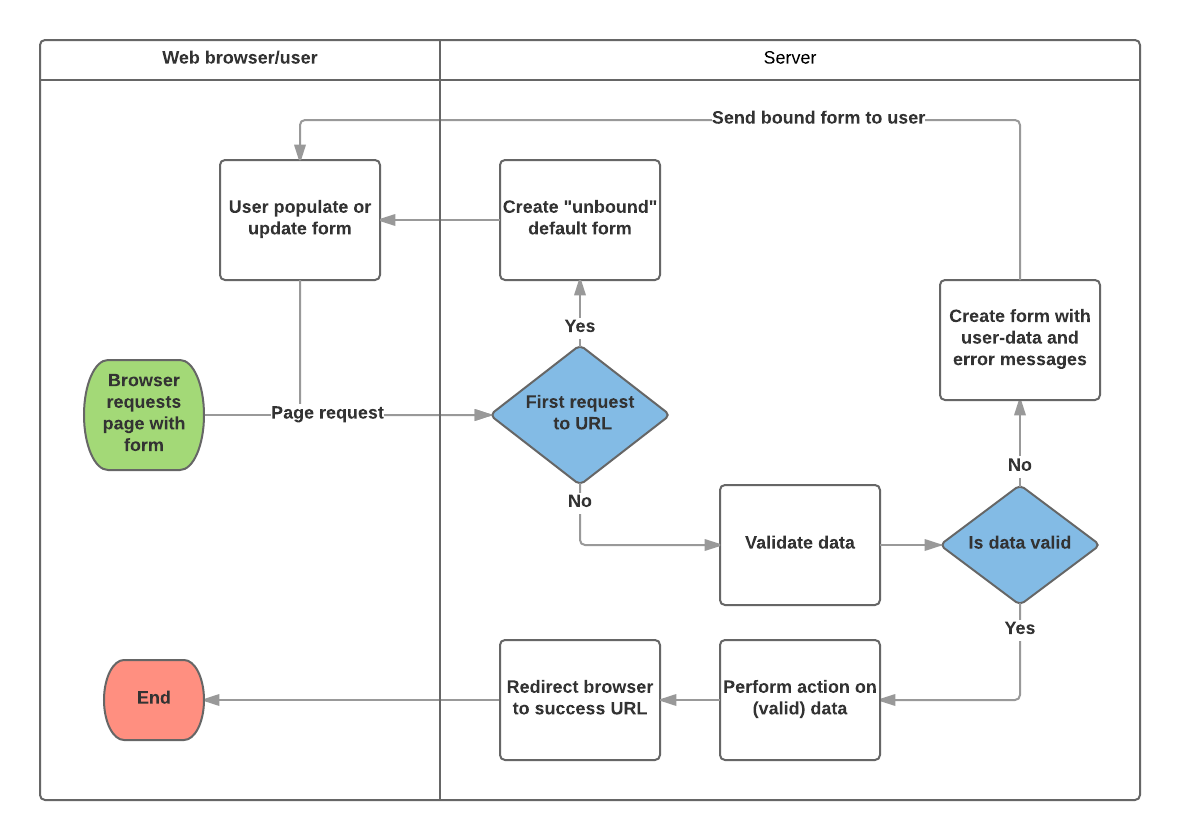
Based on the diagram above, the main things that Django’s form handling does are:
- Display the default form the first time it is requested by the user.
- The form may contain blank fields if you’re creating a new record, or it may be pre-populated with initial values (for example, if you are changing a record, or have useful default initial values).
- The form is referred to as unbound at this point, because it isn’t associated with any user-entered data (though it may have initial values).
- Receive data from a submit request and bind it to the form.
- Binding data to the form means that the user-entered data and any errors are available when we need to redisplay the form.
- Clean and validate the data.
- Cleaning the data performs sanitization of the input fields, such as removing invalid characters that might be used to send malicious content to the server, and converts them into consistent Python types.
- Validation checks that the values are appropriate for the field (for example, that they are in the right date range, aren’t too short or too long, etc.)
- If any data is invalid, re-display the form, this time with any user populated values and error messages for the problem fields.
- If all data is valid, perform required actions (such as save the data, send an email, return the result of a search, upload a file, and so on).
- Once all actions are complete, redirect the user to another page.