Reading-Notes
Django Models
Overview
Models define the structure of stored data, including the field types and possibly also their maximum size, default values, selection list options, help text for documentation, label text for forms, etc. The definition of the model is independent of the underlying database — you can choose one of several as part of your project settings. Once you’ve chosen what database you want to use, you don’t need to talk to it directly at all — you just write your model structure and other code, and Django handles all the dirty work of communicating with the database for you.
Designing the LocalLibrary models
When designing your models it makes sense to have separate models for every “object” (a group of related information). You might also want to use models to represent selection-list options (e.g. like a drop down list of choices), rather than hard coding the choices into the website itself — this is recommended when all the options aren’t known up front or may change.
Once we’ve decided on our models and field, we need to think about the relationships. Django allows you to define relationships that are one to one (OneToOneField), one to many (ForeignKey) and many to many (ManyToManyField).
With that in mind, the UML association diagram below shows the models we’ll define in this case (as boxes).
Example
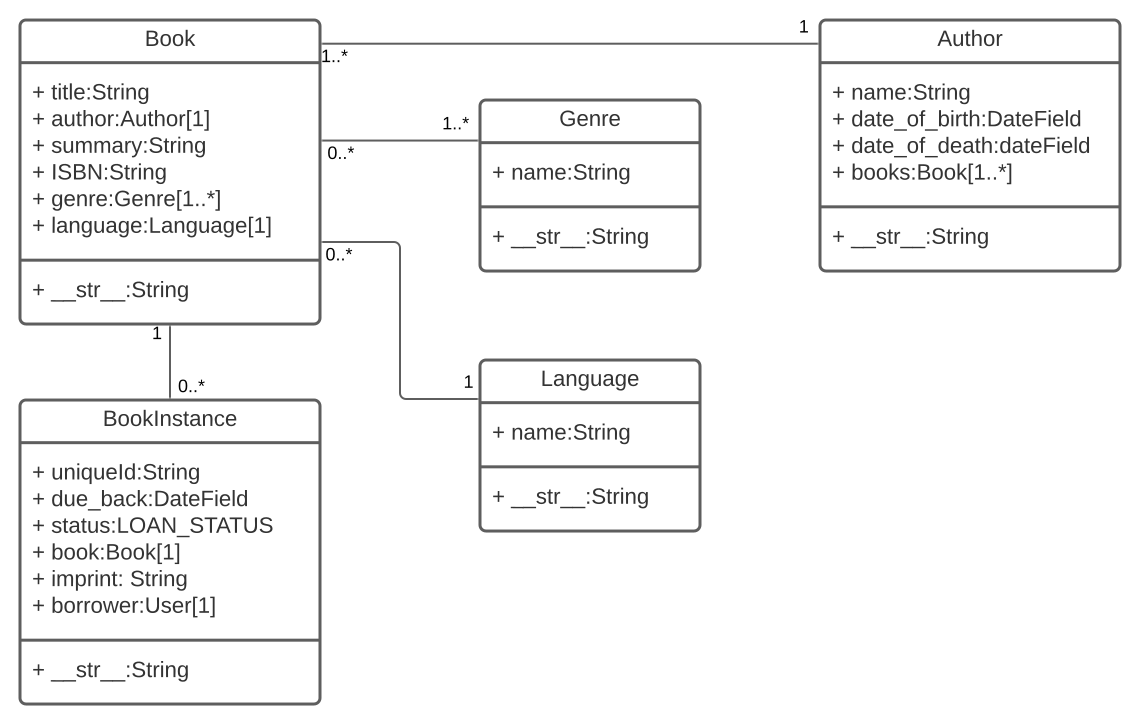
The diagram also shows the relationships between the models, including their multiplicities. The multiplicities are the numbers on the diagram showing the numbers (maximum and minimum) of each model that may be present in the relationship. For example, the connecting line between the boxes shows that Book and a Genre are related. The numbers close to the Genre model show that a book must have one or more Genres (as many as you like), while the numbers on the other end of the line next to the Book model show that a Genre can have zero or many associated books.
Model primer
Model definition: Models are usually defined in an application’s models.py file. They are implemented as subclasses of django.db.models.Model, and can include fields, methods and metadata. The code fragment below shows a “typical” model, named MyModelName:
 from django.db import models
from django.urls import reverse

class MyModelName(models.Model):
    """A typical class defining a model, derived from the Model class."""

    # Fields
    my_field_name = models.CharField(max_length=20, help_text='Enter field documentation')
    ...

    # Metadata
    class Meta:
        ordering = ['-my_field_name']

    # Methods
    def get_absolute_url(self):
        """Returns the URL to access a particular instance of MyModelName."""
        return reverse('model-detail-view', args=[str(self.id)])

    def __str__(self):
        """String for representing the MyModelName object (in Admin site etc.)."""
        return self.my_field_name
Fields
A model can have an arbitrary number of fields, of any type — each one represents a column of data that we want to store in one of our database tables. Each database record (row) will consist of one of each field value. Let’s look at the example seen below: ` my_field_name = models.CharField(max_length=20, help_text=’Enter field documentation’) `
Our above example has a single field called my_field_name, of type models.CharField — which means that this field will contain strings of alphanumeric characters. The field types are assigned using specific classes, which determine the type of record that is used to store the data in the database, along with validation criteria to be used when values are received from an HTML form (i.e. what constitutes a valid value). The field types can also take arguments that further specify how the field is stored or can be used. In this case we are giving our field two arguments:
- max_length=20 — States that the maximum length of a value in this field is 20 characters.
- help_text=’Enter field documentation’ — helpful text that may be displayed in a form to help users understand how the field is used.
The field name is used to refer to it in queries and templates. Fields also have a label, which is specified using the verbose_name argument (with a default value of None). If verbose_name is not set, the label is created from the field name by replacing any underscores with a space, and capitalizing the first letter (for example, the field my_field_name would have a default label of My field name when used in forms)
The order that fields are declared will affect their default order if a model is rendered in a form
Common fields arguments and types
Metadata
You can declare model-level metadata for your Model by declaring class Meta, as shown.
class Meta:
    ordering = ['-my_field_name']
One of the most useful features of this metadata is to control the default ordering of records returned when you query the model type. You do this by specifying the match order in a list of field names to the ordering attribute, as shown above. The ordering will depend on the type of field (character fields are sorted alphabetically, while date fields are sorted in chronological order). As shown above, you can prefix the field name with a minus symbol (-) to reverse the sorting order.
Example
ordering = ['title', '-pubdate']
- the books would be sorted alphabetically by title, from A-Z, and then by publication date inside each title, from newest to oldest.
verbose_name = 'BetterName' - a verbose name for the class in singular and plural form
Model management
- Creating and modifying records
```
Create a new record using the model’s constructor.
record = MyModelName(my_field_name=”Instance #1”)
Save the object into the database.
record.save()
You can access the fields in this new record using the dot syntax, and change the values. You have to call save() to store modified values to the database.
Access model field values using Python attributes.
print(record.id) # should return 1 for the first record. print(record.my_field_name) # should print ‘Instance #1’
Change record by modifying the fields, then calling save().
record.my_field_name = “New Instance Name” record.save()
- Searching for records
You can search for records that match certain criteria using the model's objects attribute (provided by the base class).
We can get all records for a model as a QuerySet, using objects.all(). The QuerySet is an iterable object, meaning that it contains a number of objects that we can iterate/loop through.
all_books = Book.objects.all()
Django's filter() method allows us to filter the returned QuerySet to match a specified text or numeric field against particular criteria. For example, to filter for books that contain "wild" in the title and then count them, we could do the following.
wild_books = Book.objects.filter(title__contains=’wild’) number_wild_books = wild_books.count() ```